HMH Maestro
  • Action Center
  • Topics
  • On-Call Schedules
  • CME
  • Helpful Tools
Open main menu
  • Action Center
  • Topics
  • On-Call Schedules
  • CME
  • Helpful Tools
  • Action Center
  • IT Alerts
  • DTS Action Alert Gmail Blue Check Helps Determine If External Emails Are Safe To Open
DTS Action Alert Gmail Blue Check Helps Determine If External Emails Are Safe To Open

Updated:
November 9, 2023
Published:
April 27, 2023

What You Need To Know

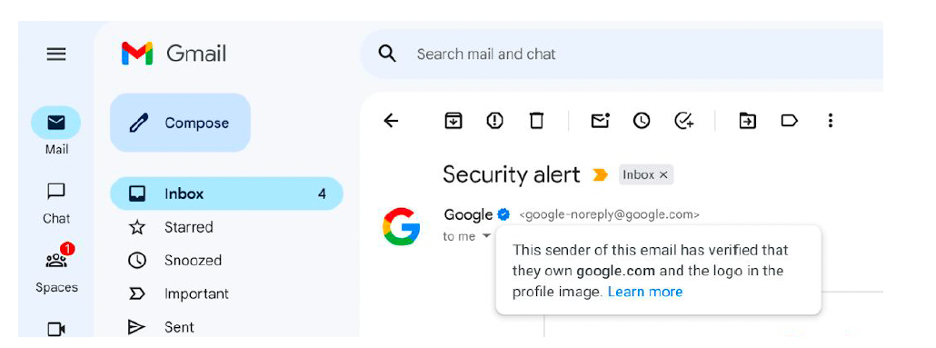
  • A new feature in Gmail helps team members determine whether an external email is from a legitimate sender.
  • Emails from a company that has verified its identity with Google will have a blue check next to their name in your inbox.
  • When you hover over the blue check in Gmail, you'll see a pop-up that reads, "The sender of this email has verified that they own [the domain it was sent from] and the logo in the profile image." The pop-up includes a link that directs you to a page with more information.

Important Note

Although the blue check is a strong indicator that the email is safe to open, it is not a complete guarantee. Please continue to follow guidelines for reporting phishing attempts.

More Information

  • MySupport.hmhn.org
  • Internal Extension: x3333
  • External Phone Number: 848-237-3333
  1. Clinical Alerts
  2. Featured Physicians
  3. Featured Specialties
  4. HMH Partners Updates
  5. Hospitals and Locations
  6. IT Alerts
  7. Leadership Announcements
  8. Legal and Regulatory
  9. Payor Updates
  10. Physician Tips
  11. Quality and Safety
  • Action Center
  • IT Alerts
  • DTS Action Alert Gmail Blue Check Helps Determine If External Emails Are Safe To Open

About HMH Maestro

  • Accessibility Statement
  • Careers

Information

  • Visitors/Guests
  • Patients

Privacy Policy|Terms & Conditions
© 2026
Hackensack Meridian Health, Inc.