

What you need to know
As part of our ongoing efforts to improve physician communications, workflow efficiency and overall experience, we are moving off the Maestro mobile app and Practice Unite as of October 29, 2021. HMH will now exclusively use Epic Secure Chat for all HIPAA-compliant text messaging.
You can still find important updates, alerts and access to tools and resources previously found on the Maestro app and Practice Unite, such as clinical alerts, IT updates and CME calendars on HMHMaestro.org. Read these Epic Secure Chat FAQs for answers to commonly asked questions.
However, Epic Secure Chat will replace the Maestro mobile app and Practice Unite for secure text communications and collaboration among clinical teams. Epic’s HIPAA-compliant messaging tools enable you to send encrypted, HIPAA-secure text messages to other Epic users at Hackensack Meridian Health, either from a desktop computer or a mobile device. Download and use our Quick Guide to get started with Epic’s Secure Chat apps.
What you need to do
Epic provides three ways to send and receive encrypted, HIPAA-secure text messages:
- Desktop: Click the “Secure Chat” icon on the activity bar in Hyperspace.
- Mobile phone: Go to your device’s app store for Android or Apple and download Haiku, the free Epic app that enables you to send and receive secure messages from other epic users on your smartphone.
- iPad: Download Canto, the free Epic app that enables you to send and receive secure messages from other epic users on your tablet.
10 Features That Save Time and Streamline Care
- Send a secure message to one or multiple people or groups
- Let other users know whether you’re Available, Busy, Unavailable by setting your availability and set messages to auto-forward to a colleague while you’re away
- Send an image from the patient chart or from your own phone or tablet
- Easily access schedules, patient charts, health summaries, test results, notes and more
- Create and send orders through Epic. (The Joint Commission doesn’t allow texting of any orders.)
- Find patients in the system and access patient lists
- Review and update patient information
- Get real-time information on patient medications, allergies, immunizations, medical history and the problem list
- View reports on inpatient or outpatient encounters including diagnosis, orders, progress notes, admission notes, vitals and discharge
- Review patient lab and imaging results and learn about new or abnormal results immediately
How to Use the Mobile App
- Once you download the Haiku or Canto mobile app, click on this URL from your phone or iPad’s Web browser. Clicking on this link will automatically configure your app.
- Under “Configure Haiku” or “Configure Canto,” tap the “Click Here” button.
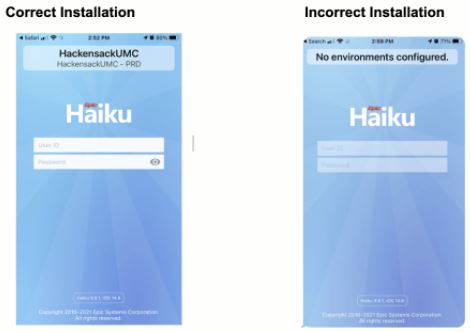
- If the installation is successful, the app will launch and you will see “Hackensack UMC” at the top of your device screen. You should now be able to sign into the application using your usual HMH-supplied credentials.
- If the installation is unsuccessful, you will see “No environments configured” at the top of your device screen. Quit the app and click on the above link in your phone’s web browser to try again.
Questions?
If you need help logging in, downloading the app or getting started, use the contact information below:
Internal Extension: x3333
External Phone Number:
South and Central Regions: 848-237-3333 or 732-776-3333
North Region: 551-996-4357
Email: EpicServiceDesk@hmhn.org